
Free · Open source · Windows 10 & 11
Get your PC match ready in one click.
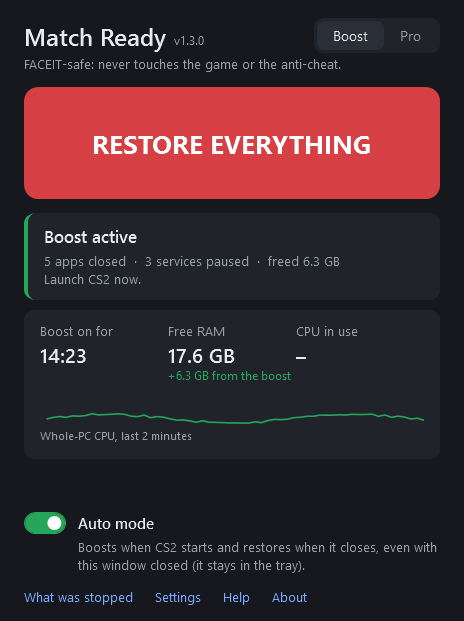
Match Ready closes the background apps that eat RAM, CPU and graphics memory, pauses noisy Windows services, and puts everything back when you're done. With Auto mode it does it all by itself when CS2 starts and stops.
Version … · no account, no ads, no telemetry
Not affiliated with Valve, Counter-Strike or FACEIT.
Install
Run Setup, click Install. No admin needed to install, nothing else to download.
Answer 3 questions
Quick setup detects your PC and asks where you queue and which mouse, headset and fan software to keep.
Play
Start CS2. Match Ready boosts, shows what it freed, and restores everything 30 seconds after you close the game.
What it does
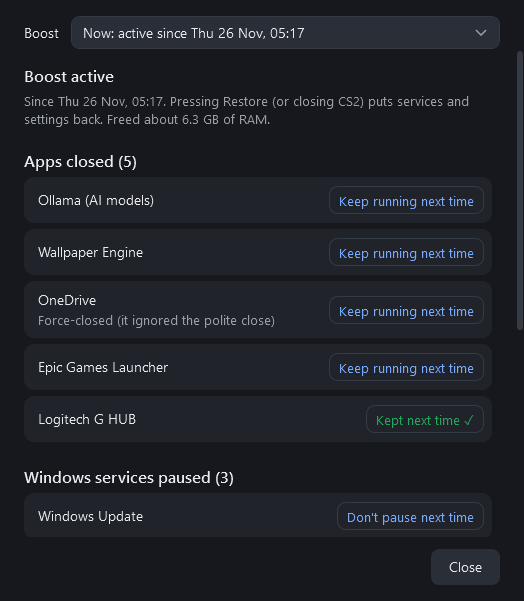
- Closes heavy background apps: local AI models, wallpaper engines, cloud sync, game launchers (never Steam), chat apps.
- Asks first before closing browsers or OBS, or never closes them if you say so.
- Pauses Windows Update, search indexing, background downloads and telemetry. Only paused, never turned off.
- High performance power plan and Windows Game Mode on.
- Live dashboard: time, free RAM (and how much the boost freed), whole-PC CPU.
- One-click updates checked against the release's SHA256, if you want them.
What it never does
- Touch CS2, Steam, FACEIT or any anti-cheat. Not even opening a handle to them.
- Change game files, configs or launch options.
- Load drivers, overlays or anything into other programs.
- Turn off Windows Security, the firewall, Secure Boot, TPM or VBS.
- Close anything that isn't on its list, or your Discord, antivirus, audio and graphics drivers.
- Make permanent changes. Every change is written down first and undone on restore, after a crash, or by a reboot.
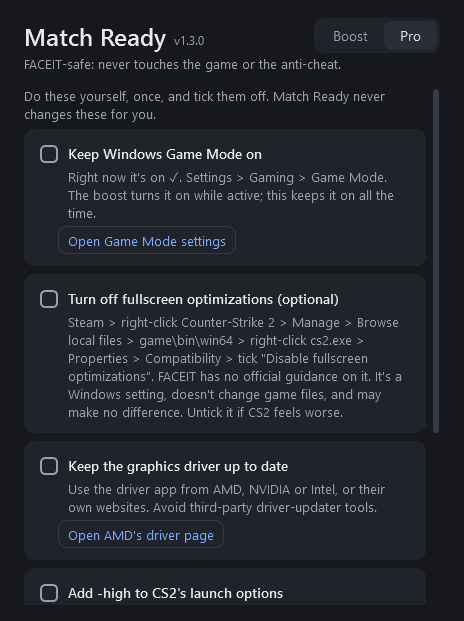
-high and FACEIT's AMD fix.Is it FACEIT-safe?
Match Ready was built around one rule: never interact with the game or the anti-cheat. It only does ordinary Windows things (closing other apps, pausing services, switching the power plan) and it never opens CS2, Steam or FACEIT, which is checked by automated tests on every build. The source is public so anyone can check.
That said, no tool can promise you'll never be banned, and anyone who does is lying. If FACEIT ever shows a warning about Match Ready, stop using it and open an issue.
Questions
Will I get more FPS?
On a strong PC, mostly steadier frame times and fewer hiccups, not big FPS jumps. The biggest wins come from closing heavy apps (local AI models, wallpaper engines) and on PCs with 8–16 GB of RAM. Match Ready shows how much RAM each boost freed, so you can see it.
Windows says "Windows protected your PC". Is it safe?
That's SmartScreen warning about a new, not-yet-signed app; signing for open-source projects has been requested. Click More info → Run anyway. Each release lists the SHA256 of every file so you can check your download with Get-FileHash.
Why does it need admin rights?
Pausing Windows services needs admin, so Windows asks once when you open it. Installing doesn't need admin. Exactly what admin is used for is listed in SECURITY.md.
How do I undo everything?
Press Restore everything, close CS2 with Auto mode on, or just restart your PC. If the app was ever closed mid-boost, it puts everything back the next time it starts.
Does it collect any data?
No. No account, no telemetry, no ads. The only network use is optional: asking GitHub whether there's a new version, and downloading it when you click Update.
Will it close my headset or mouse software?
Not unless you tell it to. Quick setup shows the device software it found on your PC and keeps it running by default.